For Claude Enterprise admins, IT teams and MSPs
Claude Enterprise budgets that manage themselves
Show every person what their Claude usage costs and why. Let them raise their own spend limit within rules you set, send bigger asks for approval, and put every increase back on the 1st, automatically.
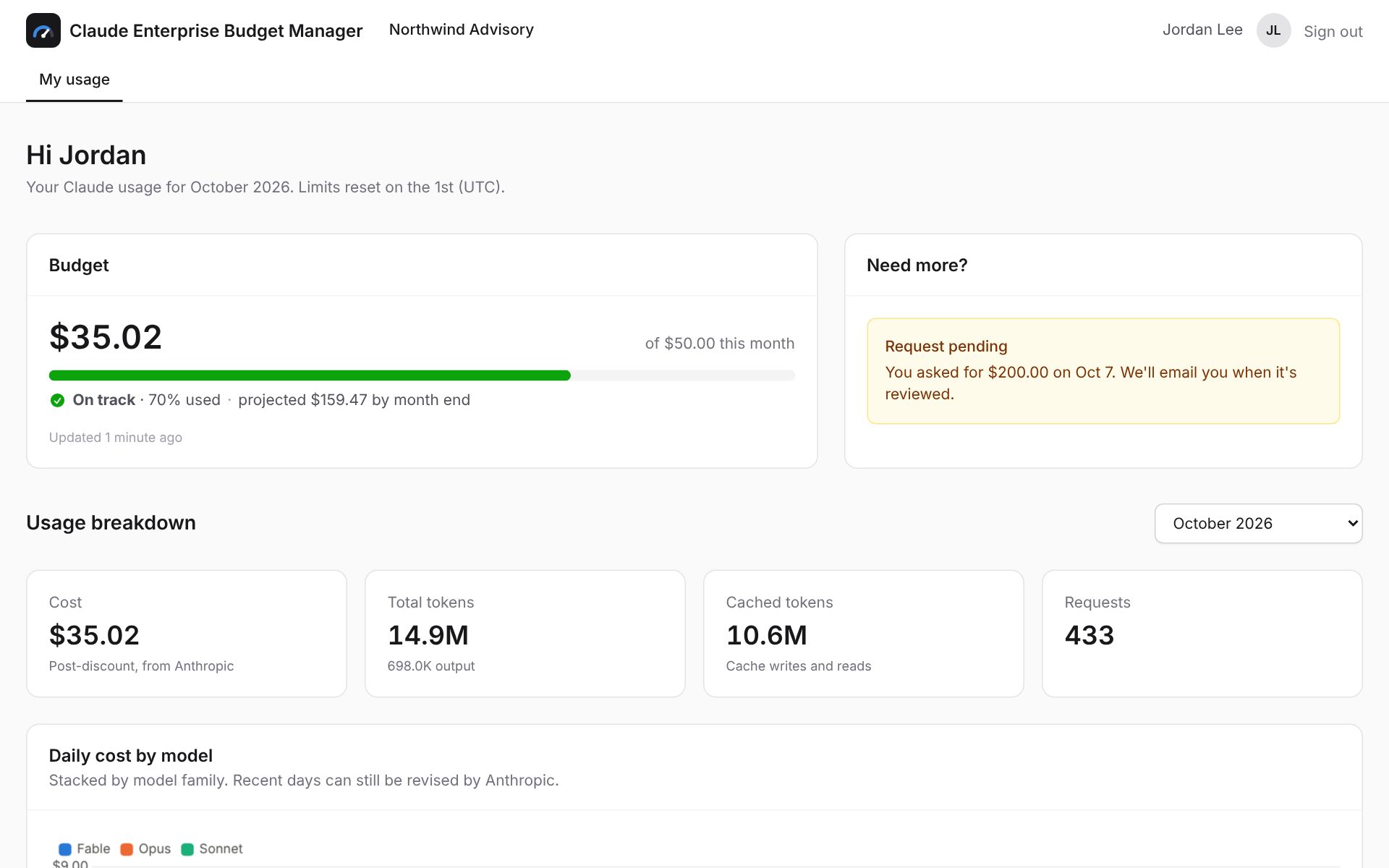
"Can you raise my Claude limit to $200?"
It is a reasonable ask, and it turns into a ticket. IT asks why the limit is being hit six days into the month, waits for an answer, gets sign-off, raises the limit in claude.ai, and then has to remember to lower it again next month.
Claude Enterprise Budget Manager turns that into rules you set once. People can see what they have used and ask for more in a couple of clicks. You only get involved when it matters.
-
Without it
A ticket per request, questions back and forth, and limits that quietly stay raised.
-
With it
Small increases are instant and logged, big ones arrive with context for a one-click decision, and everything resets on the 1st.
How it works
Set up in an afternoon. After that, it mostly runs itself.
-
1
Connect Claude Enterprise
Your primary owner creates one key in claude.ai with spend-limit and analytics scopes. Seats, limits and usage sync in a few minutes.
-
2
Set budget tiers
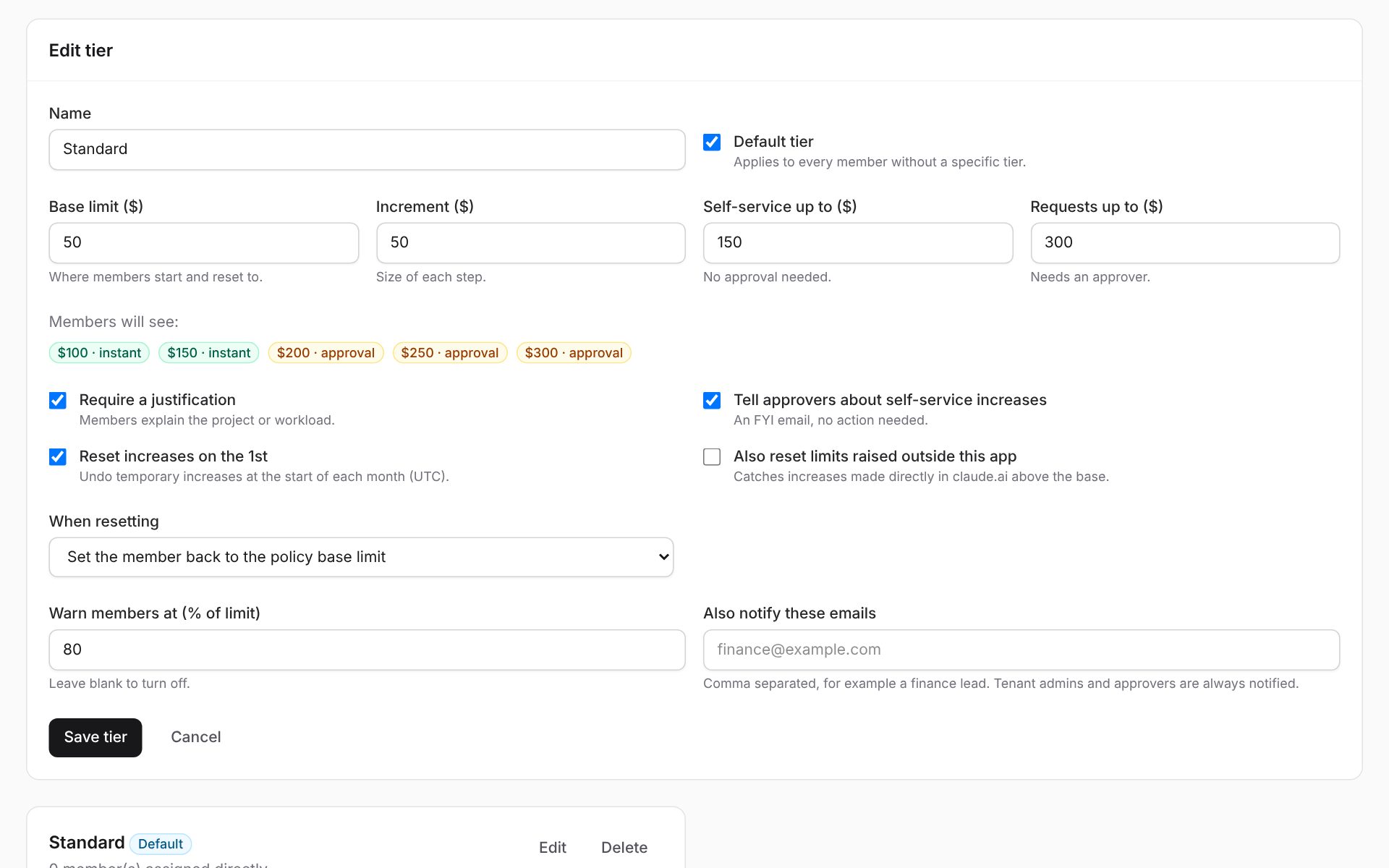
Choose a base limit, the step size, how high people can go on their own, and the most anyone can ask for with approval.
-
3
People serve themselves
Users see what they have used and why, pick a higher limit and say what it is for. Small increases apply at once; larger ones go to an approver.
-
4
Limits reset on the 1st
Temporary increases go back to the base limit automatically when Claude's monthly spend resets, and everyone is told.
Everything you need to run Claude Enterprise spend
Built on Anthropic's Spend Limits and Analytics APIs, so every number and every limit change is the real one in your Claude organization.
Personal usage dashboards
Spend against the limit, a month-end projection, and daily cost by model. Token, cache and request counts per model, plus cost by product: chat, Claude Code, Cowork and more.
Self-service budget tiers
For example: $50 a month, raise in $50 steps, instant up to $150, with approval up to $300. Assign tiers per person or use an organization default.
Approvals with context
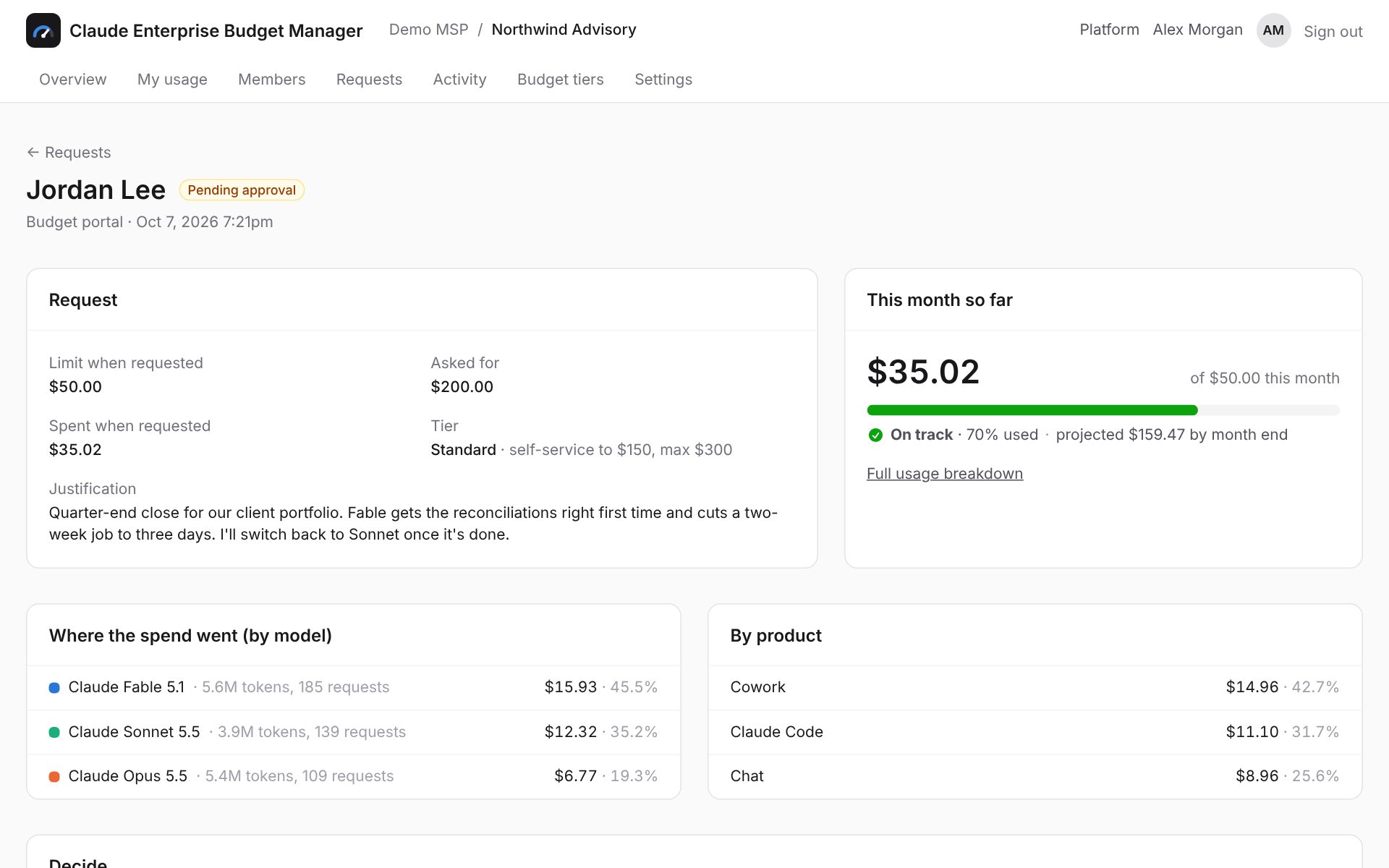
Approvers see the justification next to where the money went: which models, which products, how fast. Approve at any step or decline with a note. Nobody approves their own request.
Works with "Request more usage"
Requests made from claude.ai come in automatically. People are asked to finish them with an amount and a reason, and decisions are passed back to claude.ai.
Automatic monthly resets
Increases are temporary by default and revert at the start of each month. Optionally catch limits someone raised directly in claude.ai, too.
Early warnings
People are emailed when they pass a threshold you choose, such as 80%, so they can plan or ask before they are blocked mid-task.
Full audit trail
Every limit change is logged with who made it, why, whether it was temporary, and when it was reverted.
Google and Microsoft sign-in
No passwords to manage. People sign in with their work account and are matched to their Claude seat by email.
Product screens
Decide in one look
Every request shows what the person asked for, why, what they had already spent, and which models and products the money went on. Approve at the amount you are comfortable with, or decline with a note. Either way, they get an email.
Rules, not tickets
Budget tiers capture your policy once: where people start, how far they can go on their own, who to notify, and what happens on the 1st. A live preview shows exactly what people will be offered.
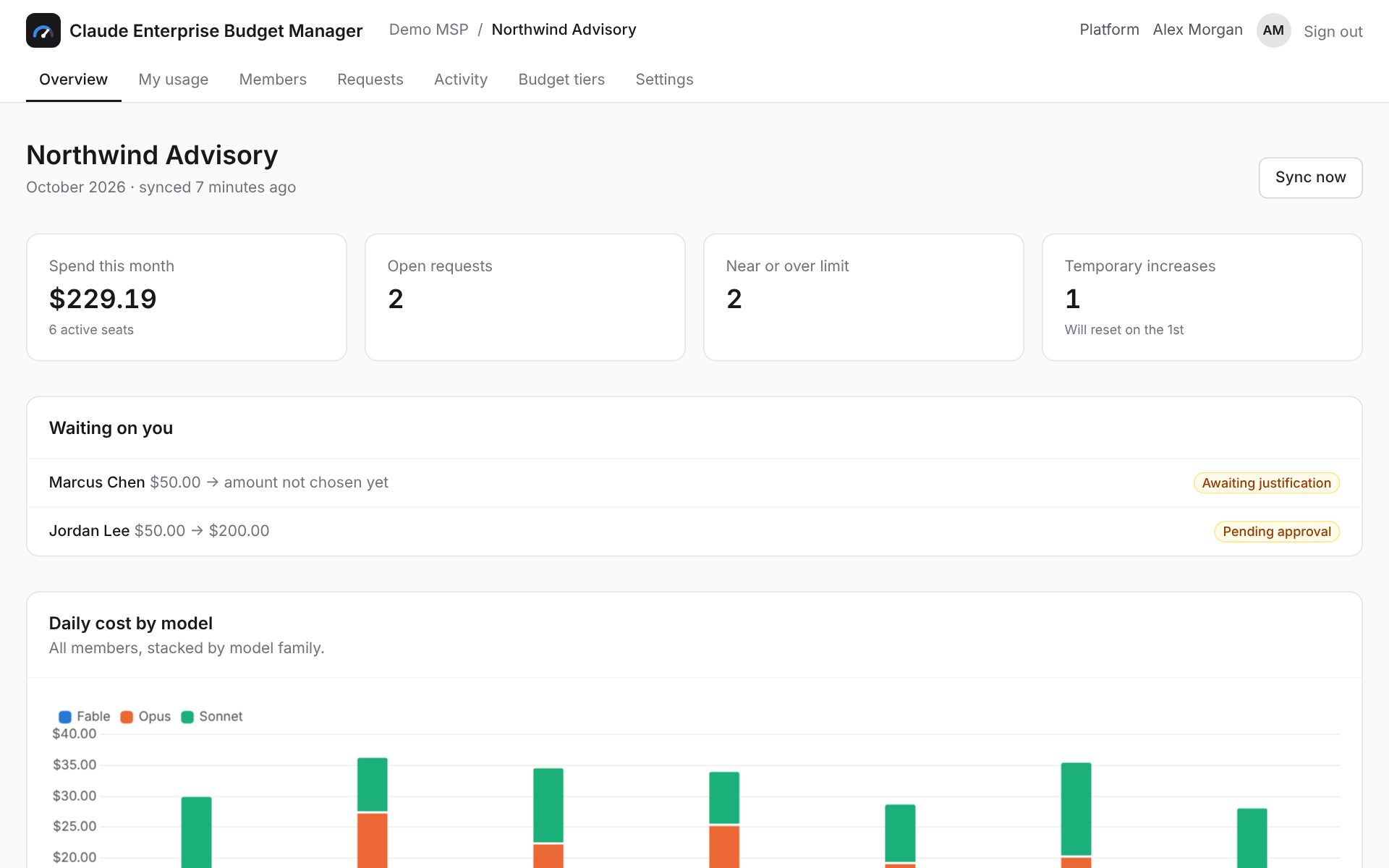
See the whole organization
Month-to-date spend, open requests, who is close to their limit, top spenders and model mix, all on one page. Add someone to a different tier or change a limit directly when you need to.
Least privilege by design
It only asks for what it needs, and it never needs your conversations.
-
Scoped keys
Spend-limit and analytics scopes only. Chat titles need a separate, optional Compliance key you can leave out.
-
Encrypted at rest
Anthropic and Mailgun keys are encrypted in the database and never shown again after they are saved.
-
No message content
Usage, cost and project activity come from Anthropic's analytics, which contain no prompts or responses.
-
Single sign-on
Google or Microsoft work accounts only, with Microsoft guest accounts and unverified Google addresses refused.
-
Separation of duties
Admins, approvers and members each see only what they need, and approvers cannot approve their own requests.
-
Revocable any time
Revoke the key in claude.ai and access stops immediately. Limits stay exactly as they are in Claude.
Built for MSPs, too
Run Claude Enterprise budgets for every client from one place. Each client gets their own tiers, approvers and dashboards. Your technicians get one queue across all of them.
See the MSP features- Multi-tenant from day one
- MSP admin and technician roles
- Your own Mailgun domain, or theirs
- Direct customers alongside MSP clients
Frequently asked questions
Which Claude plans does it work with?
Claude Enterprise organizations with usage credits turned on. That is where Anthropic offers per-user spend limits and the APIs this product uses. Claude Pro, Max and Team plans are not supported.
What access does it need to our Claude organization?
Your primary owner creates a key in claude.ai with the spend-limit read and write scopes and the analytics read scope. A Compliance key is optional and only used to show chat titles. Keys are encrypted at rest and can be revoked in claude.ai at any time.
Can it read our conversations?
Not by default. Usage, cost and project activity come from Anthropic's analytics, which contain no message content. Chat titles only appear if you choose to add a Compliance key.
Can it show cost per chat or per project?
Anthropic reports cost per person by model, product and day, so that is what we show. Projects come with message and conversation counts rather than an estimated cost.
How current is the data?
Limits, month-to-date spend and requests from the claude.ai "Request more usage" button sync every few minutes. Detailed cost and token breakdowns usually land within four hours.
What happens at the end of the month?
Claude resets spend at 00:00 UTC on the 1st. A few minutes later every temporary increase goes back to its tier's base limit and each person gets an email, so nobody has to remember to lower limits.
We are an MSP. Can we run this for all our clients?
Yes. Manage every client tenant from one MSP view, give technicians approval rights, and send notifications from your own Mailgun domain, or let each client use theirs.
Is this made by Anthropic?
No. It is an independent product by Inspired that uses Anthropic's published Claude Enterprise APIs. It is not affiliated with, sponsored or endorsed by Anthropic.
Stop managing Claude limits by ticket
Tell us about your Claude Enterprise rollout and we'll get your organization, or your clients, set up.